Learning how to create video captions with AI opens up new possibilities for efficient and accurate captioning, making videos more accessible and engaging for diverse audiences. This innovative approach harnesses the power of artificial intelligence to streamline what was traditionally a time-consuming process, offering both convenience and precision in content creation.
By leveraging advanced AI tools and platforms, content creators can generate, edit, and customize captions effortlessly. From optimizing videos for transcription to embedding captions seamlessly into videos, this guide provides a comprehensive overview of transforming your video accessibility strategy through AI-driven captioning solutions.
Overview of AI-powered Video Caption Creation

Artificial Intelligence (AI) has revolutionized the way multimedia content is produced and consumed, particularly in the realm of video accessibility. AI-powered video caption creation leverages advanced algorithms to generate accurate, real-time captions that enhance the viewer experience and ensure content compliance with accessibility standards. This technology simplifies the traditionally manual process of captioning, enabling creators and organizations to produce high-quality captions efficiently and at scale.
By utilizing AI-driven solutions, video producers can automate the transcription process, significantly reducing time, effort, and costs associated with manual captioning. These systems are capable of understanding spoken language, contextual nuances, and even background sounds, providing comprehensive captions that improve understanding for diverse audiences, including those with hearing impairments or non-native speakers.
Process of Generating Video Captions Using Artificial Intelligence
The process begins with the AI system analyzing the audio track of a video. Advanced speech recognition models, often powered by deep learning techniques, transcribe spoken words into text with high accuracy. This transcription is then synchronized with the video timeline to ensure captions appear at precise moments, maintaining the natural flow of dialogue or narration. Additional processing may include filtering out background noise, correcting transcription errors, and adding punctuation or speaker identification to enhance readability.
Many AI captioning tools employ natural language processing (NLP) to interpret context, improve transcription accuracy, and handle colloquial language or accents. Some systems also integrate with video editing platforms or content management systems to automate the entire workflow, from transcription to caption deployment.
Benefits of Using AI for Captioning Videos
Implementing AI for caption creation offers numerous advantages that directly impact content accessibility and production efficiency. These benefits include:
- Significant reduction in time required to produce captions compared to manual transcription methods.
- Cost savings by minimizing the need for human transcribers, especially for large volumes of video content.
- Enhanced accuracy and consistency in captions, with ongoing improvements driven by machine learning models.
- Capability to generate captions in multiple languages, supporting global content distribution.
- Real-time captioning possibilities, enabling live broadcasts and events to be accessible instantly.
Furthermore, AI-based captioning tools continuously learn from new data, which improves their performance over time, making them increasingly reliable and adaptable to various content types and dialects.
Typical Workflow in AI-Based Caption Creation
The workflow for AI-driven video captioning generally involves several structured steps that streamline the entire process. These steps ensure that captions are accurate, synchronized, and ready for publication efficiently.
- Audio Extraction: The first step involves isolating the audio track from the video file, which serves as the input for speech recognition.
- Speech Recognition: AI models transcribe the spoken words into text, leveraging deep learning algorithms trained on vast datasets to improve accuracy.
- Text Processing and Editing: The transcribed text undergoes processing to correct errors, add punctuation, identify speakers, and interpret contextual nuances.
- Synchronization: The processed captions are timed precisely to match the video’s dialogue or narration, ensuring they appear at the appropriate moments.
- Formatting and Enhancement: Final adjustments, such as font styling, positioning, and inclusion of sound cues or descriptions, are applied to improve readability and accessibility.
- Export and Integration: The completed captions are exported in compatible formats (e.g., SRT, VTT) and integrated into the video platform or content management system for distribution.
This workflow can be automated further through AI tools that integrate seamlessly with video editing software, enabling rapid turnaround times and consistent caption quality across diverse content libraries.
Selecting suitable AI tools and platforms
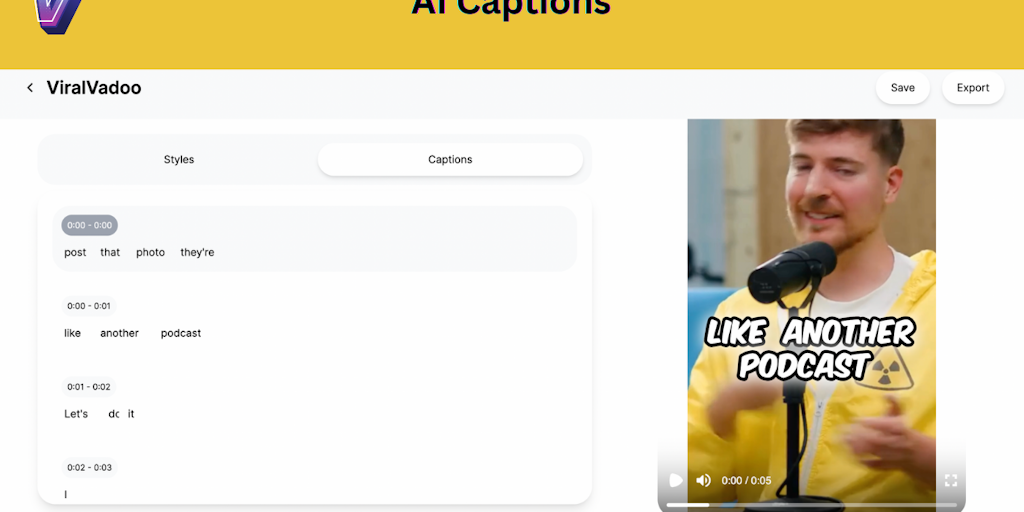
Choosing the right AI-powered captioning tool is a critical step in ensuring accurate, efficient, and seamless caption creation for your videos. The landscape of AI captioning platforms offers a variety of options, each with distinct features catering to different needs and video formats. An informed selection process can significantly enhance the quality of your captions while optimizing workflow integration.
In this section, we will explore popular AI captioning tools, compare their core features, Artikel criteria for selecting the most appropriate platform based on your specific video requirements, and discuss effective methods for integrating these tools with existing video editing software.
Popular AI captioning tools and their features
Numerous AI-driven captioning solutions are available in the market, each designed to address various needs such as accuracy, language support, customization, and ease of use. Here is an overview of some of the leading tools:
| Tool | Core Features | Strengths | Limitations |
|---|---|---|---|
| Rev.ai | Real-time speech recognition, multi-language support, customizable captions | High accuracy, extensive language options, robust API for integration | Premium pricing, requires technical setup for advanced features |
| Otter.ai | Automatic transcription, speaker identification, collaborative editing | User-friendly interface, good for team workflows, supports various formats | Less effective with noisy audio, limited customization options |
| Descript | AI transcription, video editing, captioning, overdubbing | All-in-one platform, intuitive editing tools, supports direct publishing | Subscription cost can be high for extensive use, learning curve for advanced features |
| Veed.io | AI captioning, subtitle editing, video enhancement tools | Web-based, easy to use, quick caption generation | Limited advanced customization, dependent on internet connectivity |
| Trint | AI transcription, captioning, translation, integration options | High transcription accuracy, supports multiple languages, export flexibility | Pricing may be prohibitive for small-scale projects, occasional delays with complex audio |
Criteria for selecting an AI captioning platform
Making an optimal choice requires evaluating your video’s specific characteristics and your workflow preferences. Consider the following criteria:
- Video Type and Content Complexity: For videos with technical jargon or multiple speakers, select tools with superior speech recognition accuracy and speaker differentiation capabilities.
- Video Quality and Audio Clarity: Clear audio enhances transcription accuracy. If your videos have background noise or poor audio quality, opt for platforms with noise suppression and audio enhancement features.
- Language Support: Ensure the platform supports the primary language(s) of your videos, especially if working with multilingual content or international audiences.
- Customization and Formatting: Depending on your branding needs, choose tools that allow customization of caption styles, timing, and synchronization options.
- Workflow Integration: Compatibility with your existing video editing or content management system is essential. Platforms offering robust APIs or direct integrations facilitate smoother workflows.
- Budget Constraints: Balance your requirements with available budget, considering subscription costs, pay-per-use models, or enterprise licensing options.
Integrating AI captioning tools with video editing software
Effective integration of AI captioning solutions into your video production process can save time and improve overall quality. Here are some recommended methods:
- API Utilization: Many AI platforms provide APIs that can be connected directly with your video editing software or content management systems. This approach allows automated caption generation and synchronization without manual uploads.
- Plugin and Extension Support: Some tools offer plugins or extensions compatible with popular video editing platforms like Adobe Premiere Pro, Final Cut Pro, or DaVinci Resolve. Installing these plugins streamlines the captioning workflow within familiar environments.
- Export and Import Capabilities: When direct integration isn’t available, export captions from the AI tool in standard formats (such as SRT, VTT, or SBV) and import them into your editing software. Ensuring format compatibility is essential for smooth integration.
- Batch Processing and Automation Scripts: Use scripting or batch processing features to automate caption generation for multiple videos, particularly when managing large projects or content libraries.
- Cloud-Based Collaboration: Cloud platforms often facilitate collaboration, allowing multiple team members to review and edit captions seamlessly, which can be integrated into your existing project management workflows.
Adopting these methods ensures that AI-generated captions are efficiently incorporated into your video editing process, maintaining high standards of accuracy and synchronization while optimizing overall productivity.
Preparing Videos for AI Captioning

Optimizing videos prior to AI-based captioning is essential to ensure high transcription accuracy and efficient processing. Proper preparation involves refining various aspects of the video file to align with the capabilities and requirements of AI transcript engines. This process not only enhances the quality of the generated captions but also reduces the need for extensive post-processing edits, saving time and resources.
Effective pre-processing includes selecting appropriate encoding formats, ensuring optimal resolution, and maintaining audio clarity. These factors directly influence the AI’s ability to accurately interpret speech content. By systematically addressing these considerations, content creators can significantly improve the overall quality and reliability of automated captioning solutions.
Optimizing Video Files for Improved Transcription Accuracy
To achieve the best results from AI transcription tools, videos must be prepared with specific technical standards in mind. This involves ensuring compatibility with the platform’s supported formats, choosing suitable resolution settings, and maximizing audio clarity. These steps collectively contribute to cleaner and more precise caption outputs, which are especially critical for professional or accessibility-focused video content.
- Selecting Appropriate Encoding Formats: AI captioning platforms typically support formats like MP4 (H.264 codec), MOV, or AVI. Converting videos into these standard formats reduces processing issues and enhances compatibility. Using MP4 with H.264 encoding is generally recommended because it offers a balance of quality and compression efficiency, making it suitable for most platforms.
- Adjusting Video Resolution: Higher resolutions generally provide more detail, but can increase processing time and file size. A resolution of 720p (1280×720) often delivers sufficient clarity for accurate transcription without excessive computational demand. For videos with fine details or complex backgrounds, increasing to 1080p (1920×1080) may be beneficial, provided the platform supports it.
- Enhancing Audio Clarity: Since speech recognition is highly dependent on audio quality, it is crucial to minimize background noise and ensure consistent volume levels. Using noise reduction tools and balancing audio levels before uploading can greatly improve transcription accuracy. Clear speech enunciations and minimal echo or reverb contribute to more precise caption generation.
Pre-processing Procedures for Video Enhancement
Before submitting videos for AI captioning, implementing a structured pre-processing workflow can dramatically improve results. This includes converting files to compatible formats, stabilizing video quality, and optimizing audio tracks. Proper pre-processing minimizes errors caused by technical issues and ensures the AI system receives the best possible input, leading to more accurate and coherent captions.
| Procedure | Description | Recommended Tools |
|---|---|---|
| Format Conversion | Convert videos into supported formats like MP4 with H.264 codec to ensure compatibility and reduce processing errors. | HandBrake, FFmpeg, Adobe Media Encoder |
| Resolution Adjustment | Resize videos to 720p or 1080p depending on content detail and platform support, balancing quality and file size. | FFmpeg, Adobe Premiere Pro, DaVinci Resolve |
| Audio Enhancement | Apply noise reduction and volume normalization to improve speech clarity, facilitating better transcription results. | Audacity, Adobe Audition, iZotope RX |
| Video Stabilization | Correct shaky footage to provide a steady visual reference, which can indirectly enhance audio detection proficiency. | Adobe Premiere Pro, DaVinci Resolve, VirtualDub |
Proper pre-processing ensures that AI transcription engines operate on the highest quality inputs, thereby increasing caption accuracy, especially in complex or noisy video environments.
Editing and Refining AI-Generated Captions
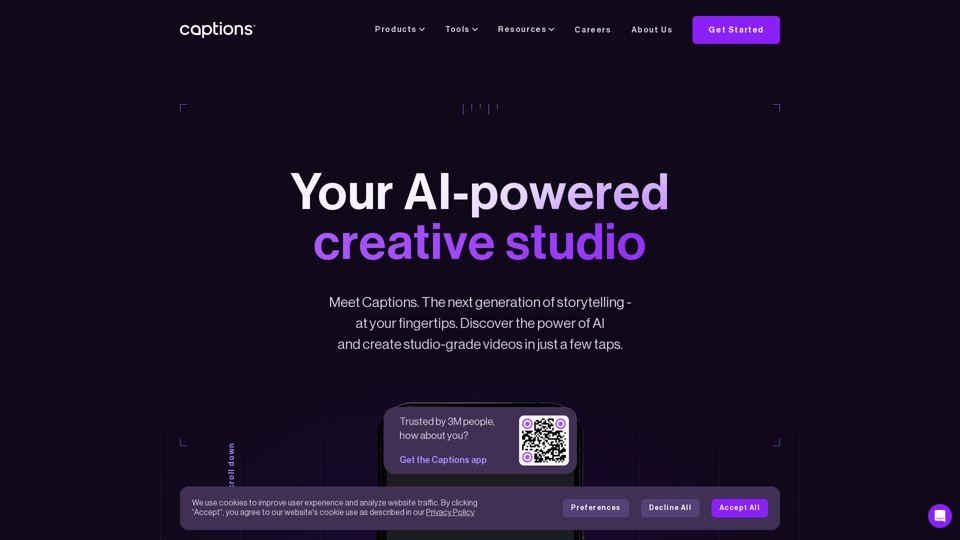
Creating accurate and synchronized captions is a crucial step in ensuring the accessibility and professionalism of your videos. While AI tools have become increasingly sophisticated, human oversight remains essential to correct errors, improve readability, and add nuanced details that machines may overlook. This stage involves reviewing AI-produced captions meticulously and making necessary adjustments to achieve a polished output that aligns perfectly with the visual and auditory content of the video.Effective editing and refinement not only enhance caption accuracy but also improve viewer engagement by providing clear, contextually appropriate, and synchronized text.
This process ensures that captions serve their purpose in making content accessible to diverse audiences, including those with hearing impairments or language barriers.
Reviewing and Correcting Captions for Accuracy and Synchronization
The primary focus during this phase is to verify that the captions accurately reflect the spoken dialogue, sound cues, and contextual nuances. Precise synchronization between captions and the audio ensures that viewers can follow along effortlessly, especially in fast-paced or complex scenes.Begin by watching the video in its entirety, paying close attention to the timing and transcription of spoken words.
Cross-reference the AI-generated captions with the actual audio, listening for misheard phrases, omitted words, or grammatical errors. Note any discrepancies in timing, such as captions appearing too early or late, which can distract viewers or cause confusion.It is beneficial to utilize tools that highlight timing issues, allowing for easy adjustments. Many AI captioning platforms include built-in review features that facilitate quick playback and editing.
For more detailed refinement, exporting captions to external editing software—like Subtitle Edit or Aegisub—can provide advanced control over timing, text, and formatting.
Editing Captions within AI Tools or External Editors
The editing process can be conducted directly within the selected AI platform or through dedicated subtitle editing software, depending on your preferences and the complexity of the project. AI platforms often offer user-friendly interfaces where you can click on individual caption segments to modify text, adjust timing, or improve formatting.When editing within the AI tool:
- Use the timeline feature to synchronize captions precisely with the audio. This involves dragging caption segments to match speech timing accurately.
- Employ spell check and grammar correction functionalities to enhance readability.
- Utilize auto-correct options and suggestive editing features to expedite the process.
For more detailed edits or batch modifications, exporting captions in formats like SRT or VTT allows editing in external software:
- Open the exported caption file within an editor such as Subtitle Edit, which provides visual waveforms and timeline views, facilitating precise adjustments.
- Modify caption text directly within the editor and adjust timing by dragging caption blocks or entering time codes manually.
- Preview the video with the edited captions within the software to ensure perfect synchronization before re-importing or exporting the final version.
Incorporating Speaker Identification and Sound Descriptions
Enhancing captions with speaker labels and sound descriptions significantly improves accessibility and viewer comprehension, especially in multi-speaker scenarios or videos with rich auditory cues.Speaker identification involves adding labels such as “Speaker 1:”, “Interviewer:”, or “Host:” before dialogue segments to clarify who is speaking. This is particularly important in interviews, panel discussions, or group conversations, where tracking speakers aids understanding.Sound descriptions provide additional context for non-verbal sounds, like background noises, music cues, or specific sound effects.
For example, describing footsteps approaching or a door creaking helps viewers interpret the scene more fully.Integrating these elements involves:
- Analyzing the audio to identify speakers and significant sounds during the review phase.
- Adding speaker labels consistently at the start of each speaker’s dialogue block within the captions, ensuring clarity without clutter.
- Including sound descriptions as brief, descriptive annotations within the captions. These should be concise yet informative, placed in brackets or italics to distinguish them from dialogue.
Most AI captioning tools support the addition of speaker labels and sound descriptions as part of the editing process. When such features are absent, manually editing the caption files externally is recommended. For best results, maintain consistency in style and abbreviate descriptions to avoid overwhelming viewers while providing essential context. Properly annotated captions contribute significantly to the overall accessibility and viewer experience of your videos.
Exporting and Embedding Captions into Videos
Creating accessible and accurately synchronized captions is a crucial step in the video production process. Once AI-generated captions are refined, the next phase involves exporting these captions in appropriate formats and embedding them seamlessly into the video files. Proper handling of this process ensures that captions are both easily accessible and synchronized with the video content across various platforms and devices, enhancing viewer experience and meeting accessibility standards.Exporting captions from AI tools involves choosing suitable file formats that are compatible with different media players and editing software.
Embedding captions directly into videos ensures they are permanently integrated, allowing for a smoother viewing experience without relying on external files. Additionally, synchronizing captions with edited videos demands careful adjustment to maintain timing accuracy, especially if the video has undergone cuts or sequence changes.
Exporting Captions in Different File Formats
The ability to export captions in multiple formats provides flexibility for various use cases, such as sharing, editing, or uploading to different platforms. Common formats include SRT, VTT, and TXT, each serving specific requirements:
- SRT (SubRip Subtitle): Widely supported across media players and platforms. It includes time codes and text, making it suitable for most online videos and editing software.
- VTT (WebVTT): Designed for web-based videos, this format offers additional metadata support and styling options, making it ideal for HTML5 videos.
- TXT (Plain Text): Basic text format that contains only the caption content without timing information, useful for quick review or manual synchronization.
To export in these formats, most AI captioning tools provide straightforward options within their interface. Selecting the desired format, specifying quality settings, and saving the file enables smooth integration into your workflow. For example, exporting an SRT file from an AI platform typically involves clicking an export button and choosing the format from a dropdown menu.
Embedding Captions into Video Files
Embedding captions directly into video files can be achieved through various methods, ensuring captions are permanently integrated and universally viewable. This process can be performed via software solutions or command-line tools, depending on the complexity and specific needs.
- Using Video Editing Software: Programs like Adobe Premiere Pro, Final Cut Pro, or DaVinci Resolve allow importing caption files and embedding them into the video timeline. Once synchronized, the captions are rendered into the final video, becoming an inseparable part of the media file.
- Utilizing Command-Line Tools: Tools like FFmpeg facilitate embedding captions through command-line instructions. For example, the following command embeds an SRT caption into a video:
ffmpeg -i input_video.mp4 -vf subtitles=caption_file.srt output_video.mp4
This method is efficient for batch processing or automating workflows.
Embedding captions ensures compatibility across platforms that do not support external caption files. It also prevents issues related to caption desynchronization or missing files during playback.
Synchronizing Captions with Edited Videos
Maintaining caption synchronization after editing videos requires careful adjustments, especially when clips are cut, reordered, or time-shifted. Accurate synchronization preserves the viewer experience and maintains accessibility standards.To achieve this, consider the following procedures:
- Re-calibrate Timing: Use caption editing tools such as Aegisub or Subtitle Edit to adjust time codes. These tools allow precise shifting of caption timestamps to align with the edited video content.
- Utilize Waveform or Visual Cues: Many caption editors provide waveform views, enabling precise placement of captions in relation to audio cues, ensuring accurate synchronization.
- Automate with Software Features: Some AI captioning platforms include features to automatically detect timing discrepancies after video edits and offer options to adjust caption timing en masse.
- Test and Review: Play back the edited video with captions to verify synchronization. Make incremental adjustments as needed to ensure captions appear at the correct moments.
Properly synchronized captions significantly improve accessibility and viewer engagement, especially in videos with complex edits or multiple cuts. Regular review and fine-tuning are recommended whenever modifications are made to the original video content.
Troubleshooting Common Issues in AI Caption Creation

Creating accurate and synchronized captions using AI tools can significantly enhance video accessibility and viewer engagement. However, despite advancements, users often encounter specific challenges that may affect the quality of captions. Addressing these issues promptly and effectively ensures that the captions serve their intended purpose without compromising viewer experience. This section delves into common problems faced during AI caption creation, providing practical solutions and best practices to resolve them, along with comprehensive checklists for quality assurance before publishing videos.AI caption generation is a complex process that relies on sophisticated algorithms to transcribe speech and synchronize text with video content.
As with any automated system, errors such as transcription inaccuracies and timing mismatches can occur, especially in environments with background noise, multiple speakers, or technical jargon. Understanding these issues and implementing targeted troubleshooting strategies is essential for producing professional, reliable captions.
Frequent Problems in AI Caption Creation
In the process of generating captions with AI, several issues may emerge that compromise the accuracy and usability of the final output. Recognizing these problems early allows for timely intervention and refinement.
- Transcription Errors: AI may misinterpret words due to accents, speech clarity issues, or overlapping dialogue. Common mistakes include homophones, misspellings, or omitted words, which can distort meaning.
- Synchronization Issues: Captions may lag behind or race ahead of spoken words, leading to confusion. This often results from incorrect timing data or processing delays, especially with lengthy or fast-paced videos.
- Inconsistent Capitalization and Punctuation: Automated captions might lack proper capitalization, punctuation, or formatting, reducing readability and professionalism.
- Background Noise Interference: High noise levels can obscure speech signals, increasing transcription errors and decreasing caption accuracy.
- Technical Compatibility Problems: Sometimes, caption files may not align with video formats or player specifications, causing display issues or failure to embed captions correctly.
Solutions and Best Practices for Resolving Issues
Implementing effective solutions requires a combination of technical adjustments, quality checks, and iterative refinement to improve caption accuracy and synchronization.
When encountering transcription errors, consider these approaches:
- Use high-quality audio recordings with minimal background noise to enhance speech clarity for AI processing.
- Leverage AI tools that support custom vocabulary or language models tailored to specific terminology, dialects, or industry jargon.
- Perform manual corrections post-generation to address misinterpreted words, ensuring that captions accurately reflect spoken content.
Addressing synchronization issues involves:
- Adjusting timing parameters in caption editing software to fine-tune the start and end times of each caption block.
- Breaking long segments into smaller parts for more precise timing control, especially in rapid speech scenarios.
- Using tools that automatically detect and correct timing mismatches, streamlining the synchronization process.
To improve overall readability and professionalism, consider:
- Applying uniform formatting rules for capitalization, punctuation, and line breaks during manual editing.
- Adding descriptive labels or speaker identifiers if multiple speakers are involved, to clarify the dialogue.
For noise-related issues, best practices include:
- Utilizing noise reduction techniques during audio preprocessing to improve speech clarity before AI transcription.
- Choosing AI platforms with noise-robust models designed to handle challenging audio environments.
Quality Assurance Checklist Before Publishing
Ensuring caption quality prior to video release is crucial for a positive viewer experience. The following checklist provides a comprehensive guide for final review:
- Transcription Accuracy: Verify that captions correctly reflect spoken words, especially for technical terms, names, or uncommon vocabulary.
- Synchronization: Confirm that each caption appears in sync with the corresponding audio segment, with minimal lag or lead time.
- Formatting Consistency: Ensure proper use of capitalization, punctuation, and line breaks for readability.
- Speaker Identification: Label multiple speakers clearly when necessary to prevent confusion.
- Completeness: Check that no speech segments are omitted or truncated.
- Compliance: Verify adherence to accessibility standards, including caption duration and placement.
- Compatibility: Test captions across different video players and platforms to confirm proper display and embedding.
Regular review and refinement of AI-generated captions are vital to maintain high standards of accessibility and viewer engagement, especially when dealing with complex or noisy content.
Future trends in AI-assisted video captioning
As artificial intelligence continues to advance rapidly, the landscape of AI-assisted video captioning is poised for significant transformations. Emerging technologies promise to enhance accuracy, efficiency, and integration with broader multimedia workflows. Understanding these future trends equips content creators and technologists to anticipate changes and leverage new capabilities for more dynamic and accessible video content.AI-driven video captioning is increasingly moving toward more context-aware and semantically rich outputs.
Future models will better interpret nuances, idiomatic expressions, and cultural contexts, resulting in captions that not only transcribe speech but also capture underlying intent and emotion. This progression will be supported by advances in natural language understanding and multimodal AI systems that process audio, visual cues, and contextual metadata simultaneously.
Emerging Technologies and Improvements in AI Captioning
Emerging innovations are set to revolutionize how AI handles video captions, making them more accurate, adaptive, and human-like. These developments include:
- Multimodal AI Integration: Combining audio, video, and text data to produce captions that understand scene context, speaker emotions, and visual cues, leading to richer captioning that aligns with the video’s narrative.
- Enhanced Speech Recognition Models: Leveraging transformer architectures and large-scale training datasets to improve recognition of diverse accents, dialects, and background noises, significantly reducing transcription errors.
- Real-Time Captioning with Low Latency: Advancements aim for near-instantaneous caption generation, enabling live broadcasting, webinars, and interactive content to be accessible in real-time without compromising accuracy.
- AI-Driven Language Localization: Automating translation and captioning for multiple languages simultaneously, which facilitates global content dissemination and inclusivity.
- Semantic Understanding and Contextual Awareness: Future models will grasp the context within dialogues, recognizing references, sarcasm, and humor, thus producing captions that are more faithful to the original content’s tone and meaning.
Impact on Content Creation Workflows
The integration of advanced AI captioning technologies will significantly influence overall content creation processes. These improvements will streamline workflows, reduce manual editing time, and enhance accessibility, ultimately empowering creators to produce more engaging and inclusive videos efficiently.
- Automation of repetitive tasks such as initial transcription and time-synchronization will free up creators to focus on creative aspects.
- AI will enable iterative refinement, allowing creators to quickly correct and enhance captions without extensive manual intervention.
- Real-time captioning capabilities will facilitate live content production, expanding opportunities for interactive and accessible broadcasts.
- The seamless integration with AI-driven editing tools will enable automated scene tagging, caption adjustments, and synchronization within comprehensive multimedia editing platforms.
- As AI models become more sophisticated, they will support adaptive captioning tailored to diverse audiences, including those with specific accessibility needs or language preferences.
Integration with AI-Driven Video Editing Tools
The convergence of AI-assisted captioning with other AI-powered editing technologies will foster more cohesive and efficient content creation ecosystems. This synergy will enable workflows that are faster, more accurate, and highly customizable.
- Automated scene detection and segmentation will improve caption alignment with visual content, enhancing viewer comprehension.
- AI-based speech enhancement and noise reduction will improve the quality of captions, especially in challenging audio environments.
- Captioning systems will increasingly integrate with visual editing tools to allow automatic adjustments based on scene changes, emotions, or thematic shifts.
- Cross-platform AI tools will facilitate synchronized editing, captioning, and subtitling, ensuring consistency across different formats and distributions.
- The development of comprehensive AI ecosystems will support end-to-end content production pipelines, reducing time-to-publication and increasing scalability for large-scale content providers.
As AI continues to evolve, the future of video captioning will be characterized by deeper contextual understanding, seamless integration with multimedia workflows, and enhanced accessibility, making video content more inclusive and engaging for audiences worldwide.
Closing Notes
In conclusion, mastering how to create video captions with AI not only enhances the viewer experience but also ensures compliance with accessibility standards. As technology continues to evolve, integrating AI captioning into your workflow promises to improve efficiency and open new avenues for engaging global audiences with clear, properly formatted captions.