Learning how to create social media posts with AI opens new opportunities for efficient and engaging content production. Leveraging artificial intelligence can streamline your workflow, enhance creativity, and ensure consistency across various platforms.
This process involves understanding the fundamental role of AI in content generation, selecting appropriate tools, crafting compelling posts, optimizing for better engagement, and effectively scheduling and analyzing performance to continually improve your social media strategy.
Understanding the Fundamentals of AI in Social Media Content Creation
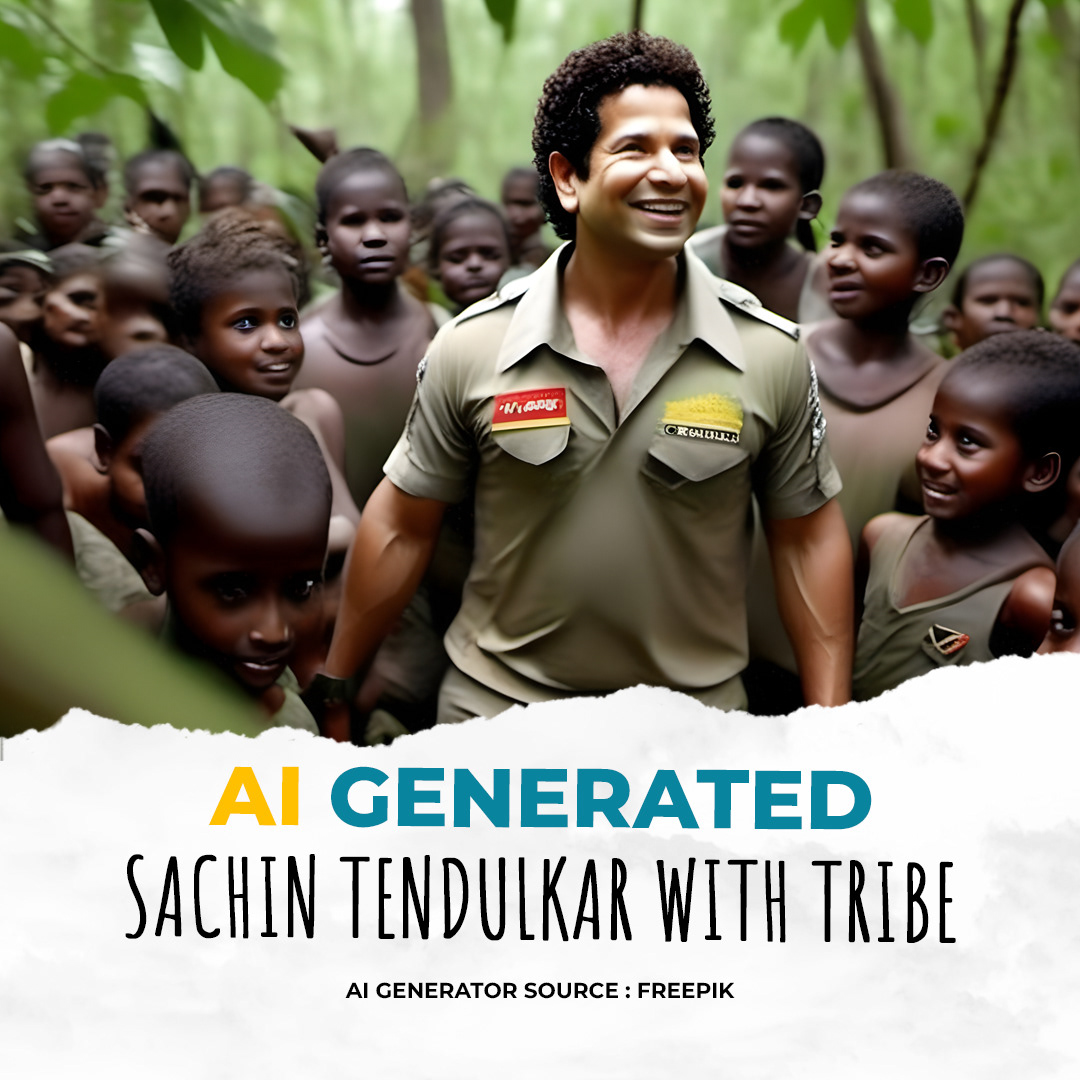
Artificial Intelligence (AI) has revolutionized the way content is developed and shared across social media platforms. Its ability to analyze vast amounts of data, automate repetitive tasks, and generate creative outputs makes it an invaluable resource for marketers, content creators, and businesses aiming to enhance their online presence. By understanding the core principles and tools of AI-driven content creation, users can leverage technology effectively to produce engaging, relevant, and timely social media posts.
AI in social media content creation encompasses a range of functionalities—from generating textual content and designing visuals to scheduling posts and analyzing engagement metrics. These tools not only streamline the content development process but also enable personalization at scale, ensuring that posts resonate with target audiences. As AI technology continues to evolve, its role in shaping dynamic, interactive, and high-performing social media campaigns becomes increasingly evident.
Role of AI in Generating Engaging Social Media Posts
AI enhances social media engagement by crafting personalized, timely, and contextually relevant content. Advanced algorithms analyze audience behavior, trending topics, and brand voice to generate posts that are more likely to attract attention and foster interaction. AI can suggest optimal posting times, tailor messages to different audience segments, and even create multimedia content such as images, videos, and captions. This automation not only saves time but also ensures consistency and quality across multiple platforms, enabling brands to maintain an active and engaging social media presence.
Types of AI Tools Used for Social Media Content
The landscape of AI tools for social media is diverse, ranging from content generation and image editing to analytics and scheduling. These tools are designed to address various aspects of social media marketing, making the process more efficient and effective. Understanding their functionalities helps users select the appropriate tools tailored to their specific needs and objectives.
| Tool Name | Main Functionality | Key Features | Best Use Case |
|---|---|---|---|
| Canva with AI features | Graphic design and visual content creation | AI-assisted design suggestions, auto-resizing, background removal | Creating eye-catching images and videos for posts |
| Copy.ai | Text generation and content writing | AI-generated captions, blog snippets, product descriptions | Generating engaging copy quickly and consistently |
| Hootsuite Insights | Social media analytics and scheduling | AI-driven sentiment analysis, optimal posting times, performance reports | Monitoring engagement and scheduling posts effectively |
| Buffer with AI integrations | Post scheduling and content management | AI recommendations for post timings, content suggestions | Streamlining content publishing across multiple platforms |
Note: Choosing the right AI tool depends on specific goals such as content creation, audience analysis, or scheduling, and often combining multiple tools yields the best results.
Setting Up AI Tools for Social Media Post Creation

Establishing an effective workflow for social media content generation begins with selecting and configuring the appropriate AI tools. A systematic setup ensures seamless integration, optimal performance, and consistency in your content output. This section provides a comprehensive guide to choosing the right AI software, configuring it for your specific needs, and integrating it smoothly with your social media platforms or content management systems.
Proper setup not only accelerates the content creation process but also enhances the quality and relevance of your posts. By following these structured steps, marketers and content creators can leverage AI to maintain an engaging online presence with minimal manual effort, while ensuring compliance with platform standards and branding guidelines.
Selecting and Configuring AI Software for Social Media
Choosing the most suitable AI tools involves evaluating features, compatibility, and scalability. Once selected, configuration process includes setting user preferences, integrating brand guidelines, and establishing workflows to automate content creation and scheduling.
- Assess Your Needs: Identify the types of content you aim to produce—be it text, images, videos, or a combination—and determine the AI functionalities required. For example, if you want automated copywriting, tools like Jasper or Copy.ai are ideal; for image generation, consider DALL·E or Midjourney.
- Research AI Software Options: Explore various platforms, focusing on features, ease of use, integration capabilities, pricing, and customer support. Reviews and case studies can provide insights into real-world performance.
- Select the Software: Pick AI tools that align with your content strategy and technical ecosystem. Opt for solutions that offer API access or integration plugins for social media platforms.
- Configure User Settings and Preferences: Set language options, tone of voice, style guidelines, and post frequency. Many tools allow saving templates or presets to streamline future content generation.
- Train or Customize AI Models: Where applicable, input brand-specific data, s, or style samples to fine-tune the AI output, ensuring consistency with your brand identity.
Integrating AI Tools with Social Media Platforms and CMS
Seamless integration of AI tools with social platforms and content management systems (CMS) enables automated publishing, analytics, and content management. This reduces manual workload and ensures timely posting.
- Establish API Connections: Use API keys or OAuth tokens provided by social media platforms (e.g., Facebook Graph API, Twitter API) to connect AI tools with your social accounts or CMS. Ensure secure handling of credentials.
- Use Integration Plugins or Connectors: Many AI platforms offer pre-built plugins or integrations with tools like Buffer, Hootsuite, or HubSpot. These facilitate scheduling and publishing directly from the AI software interface.
- Configure Automation Workflows: Set rules for content approval, scheduling times, and platform-specific optimizations. For example, you might automate post scheduling during peak engagement hours identified through analytics.
- Test the Integration: Perform trial runs to verify that content is correctly generated, formatted, and published. Monitor for errors and adjust configurations as needed.
Setup Steps and Best Practices Flowchart
| Step | Action | Outcome | Best Practice |
|---|---|---|---|
| 1 | Identify content needs and select AI tools | Aligned tools chosen | Prioritize scalability and integration features |
| 2 | Configure AI settings and preferences | Customized AI outputs | Include brand voice, tone, and style guidelines |
| 3 | Integrate with social media platforms or CMS | Automated publishing setup | Use secure API connections and validate integrations |
| 4 | Test and optimize workflows | Efficient content pipeline | Monitor performance, adjust schedules, and update templates regularly |
“A well-structured setup process ensures that AI tools serve as reliable partners in content creation, enabling consistent, engaging social media presence.”
Creating Compelling Content with AI
Leveraging AI to craft engaging social media content is essential for maintaining an active and attractive online presence. By integrating advanced AI tools, content creators can generate diverse and compelling posts efficiently, saving time while enhancing creativity. This segment explores methods for producing text-based posts, designing visual content with AI, developing a versatile content library, and illustrating these practices through practical examples.
Understanding how to harness AI effectively enables social media managers and marketers to produce content that resonates with their audience, drives engagement, and aligns with brand objectives. The following sections provide detailed strategies and practical guidance for creating captivating social media posts using AI technology.
Generating Text-Based Posts with AI
AI-powered language models facilitate the creation of high-quality, relevant, and engaging text content for social media platforms. These tools analyze input prompts, brand tone, and target audience to generate posts that are both creative and aligned with messaging goals. Using AI, content creators can produce a variety of post types, including promotional messages, event announcements, or motivational quotes, with minimal manual effort.
Effective AI-generated posts are characterized by clarity, authenticity, and relevance, ensuring they capture attention and foster engagement.
To generate impactful text-based content, input prompts should be specific yet flexible enough to allow AI creativity. For example, providing a brief about a product launch or a seasonal campaign helps the AI tailor its output to suit the context. Additionally, AI tools allow users to customize tone and style, ensuring consistency with brand voice.
Crafting Visual Content with AI Image Generation Tools
AI image generation tools enable the creation of unique visual content that complements text posts. These tools utilize generative adversarial networks (GANs) and other algorithms to produce images based on descriptive prompts. For instance, a user can input a prompt such as “a vibrant summer scene with a beach and sunset,” and the AI will generate a high-quality, original image accordingly.
Visual content is vital for capturing attention on social media feeds. AI-generated images can range from abstract art to realistic photos, tailored to specific themes or campaigns. Incorporating branding elements, such as logos or color schemes, further enhances the coherence and professionalism of the visuals.
Developing a Library for Diverse Social Media Content
Creating a well-organized library of AI-generated content ensures a steady stream of posts that can be scheduled and reused across campaigns. This library can include categories such as promotional posts, educational content, user engagement prompts, and seasonal themes. Regularly updating this collection allows for quick deployment of content aligned with current trends and marketing strategies.
To build an effective library, it is crucial to evaluate AI outputs for quality, relevance, and consistency. Tagging and categorizing content facilitate easy retrieval and adaptation for different platforms or target audiences. Integrating analytics helps refine content creation by identifying which types of posts perform best.
Example AI-Generated Social Media Posts
| Post Type | AI-Generated Content | Description |
|---|---|---|
| Promotional Post | “Discover the new features of our latest product! Experience innovation and quality like never before. Available now — shop today!” | Short, compelling promotional message designed to drive sales and awareness. |
| Inspirational Quote | “Success begins with a single step. Keep moving forward, and the future will thank you.” — AI-generated motivational quote | Engages audiences with positive and uplifting messaging. |
| Visual Content Idea | A vibrant image of a mountain landscape at sunrise, generated based on a descriptive prompt like “mountain range at dawn with warm sunlight.” | Visual content that can be used to enhance brand storytelling or thematic campaigns. |
| Educational Post | “Did you know? Our eco-friendly products reduce plastic waste by 30%. Join us in making a difference today.” | Informative content that promotes brand values and educates followers. |
Optimizing AI-Generated Posts for Engagement

Creating social media content using AI offers immense potential, but the true impact depends on how well these posts are optimized for audience engagement. This involves tailoring AI outputs to resonate with specific target groups, refining content for clarity and impact, and systematically integrating engagement elements such as hashtags and tags. By implementing effective optimization strategies, content creators can enhance visibility, foster interaction, and achieve their social media objectives more efficiently.Effective optimization transforms raw AI-generated ideas into compelling posts that capture attention and encourage action.
It ensures that content aligns with audience preferences, platform algorithms, and current trends, ultimately increasing the likelihood of shares, likes, comments, and other forms of engagement. This process requires a combination of customization, editorial refinement, and strategic use of engagement tools, all supported by structured best practices.
Customizing AI Output for Target Audiences
Adapting AI-generated content to suit specific audience segments enhances relevance and engagement. Techniques include defining audience personas with detailed demographics, interests, and behavioral traits prior to content generation. Incorporating these details into prompts guides AI to produce more tailored content. For example, if targeting young professionals interested in sustainability, prompts should emphasize eco-friendly themes and professional tone.Utilizing AI parameters to adjust tone, formality, and language style further refines output.
An AI model can be instructed to generate posts with a friendly, casual tone for Gen Z audiences or a more formal, authoritative voice for industry professionals. Analyzing past engagement metrics helps identify what resonates with different segments, guiding future customization efforts.
Editing and Refining AI-Generated Content for Clarity and Impact
While AI can produce high-quality initial drafts, human oversight is essential for polishing content. Editing involves correcting grammatical errors, clarifying ambiguous statements, and enhancing readability. Ensuring the message is concise and impactful often requires removing redundancies and emphasizing key points.Refinement also includes adjusting the tone and style to match brand voice and audience expectations. Incorporating storytelling elements or compelling calls-to-action can significantly increase user interaction.
Use tools such as readability checkers and sentiment analysis to evaluate and improve the emotional appeal and clarity of posts, ensuring they resonate effectively with viewers.
Incorporating Hashtags, Tags, and Engagement Elements Automatically
Automating the inclusion of relevant hashtags, tags, and other engagement components streamlines post optimization. Hashtag generators powered by AI can suggest trending and niche-specific tags based on post content, increasing discoverability. Similarly, tagging relevant users, brands, or locations can foster community interaction and cross-promotion.To automate these elements, integrate tools such as social media management platforms or AI plugins that analyze content s and context to suggest optimal tags and hashtags.
Establish rules for automatic placement, such as appending popular hashtags at the end of posts or tagging users based on predefined criteria, ensuring consistent and strategic engagement enhancement.
Checklist for Post Optimization Best Practices
Implementing a structured approach ensures comprehensive post optimization. Below is a table summarizing best practices:
| Practice | Description |
|---|---|
| Audience Tailoring | Customize content tone, style, and messaging based on audience demographics and preferences. |
| Clarity and Impact | Refine content for grammatical accuracy, conciseness, and emotional appeal; emphasize key messages. |
| Visual Compatibility | Use descriptive visuals or multimedia that complement the text and enhance engagement. |
| Hashtag and Tag Optimization | Apply AI-suggested trending hashtags and relevant tags automatically for broader reach. |
| Call-to-Action Inclusion | Embed clear, compelling calls-to-action to motivate audience interaction. |
| Platform Adaptation | Adjust content format and length according to platform-specific best practices. |
| Performance Monitoring | Track engagement metrics to assess effectiveness and inform future optimization strategies. |
Scheduling and Publishing AI-Produced Content
Managing the timely and efficient posting of AI-generated social media content is essential for maintaining audience engagement and consistent brand presence across multiple platforms. Proper scheduling ensures that your content reaches your target audience at optimal times, maximizing visibility and interaction. With the proliferation of AI tools, automating this process has become more accessible and effective, allowing for streamlined content dissemination tailored to various social media channels and audience behaviors.Effective scheduling involves selecting appropriate times for posting based on platform-specific engagement patterns, audience activity peaks, and content type.
It also requires integrating AI tools with scheduling platforms to automate the publication process, reducing manual effort and minimizing the risk of forgetting key posting windows. Accurate planning and automation together create a seamless flow of content that maintains relevance and sustains audience interest over time.
Procedures for Scheduling AI-Created Posts Across Multiple Platforms
Successful scheduling of AI-generated content involves several strategic steps to ensure consistency and optimal engagement. These procedures include:
- Consolidate Content Calendar: Develop a centralized schedule that aligns with marketing campaigns, thematic content, and audience behavior patterns across all social media channels.
- Use AI-Enhanced Scheduling Tools: Employ platforms that support AI integration, such as Hootsuite, Buffer, or Sprout Social, to facilitate automatic posting based on predefined timings and platform-specific requirements.
- Customize Posting Times for Each Platform: Adjust publication times to match the peak activity periods of each social network—morning for LinkedIn, early evening for Instagram, midday for Facebook, and so on.
- Set Up Automated Campaigns: Use AI-driven scheduling features to automate recurring posts, time-sensitive promotions, or content series. This reduces manual oversight and ensures consistent delivery.
- Monitor and Adjust: Analyze engagement metrics post-publication to refine scheduling strategies. AI tools often offer analytics that highlight optimal posting times, allowing for continuous improvement.
Comparison of Automation Tools Supporting AI Content Scheduling
The choice of automation tools significantly influences the efficiency and effectiveness of AI-generated content scheduling. Here is a comparative overview of popular platforms:
| Tool | AI Integration Capabilities | Supported Platforms | Key Features | Pros | Cons |
|---|---|---|---|---|---|
| Hootsuite | Yes, with AI-powered recommendations | Facebook, Twitter, LinkedIn, Instagram, YouTube | Scheduling, analytics, content curation, team collaboration | Robust analytics, multi-platform management, user-friendly interface | Higher cost, complexity for beginners |
| Buffer | Limited AI features, supports automation via integrations | Facebook, Instagram, Twitter, LinkedIn, Pinterest | Scheduling, analytics, RSS feed integration | Simple interface, cost-effective, reliable scheduling | Fewer AI-driven suggestions, limited advanced features |
| Sprout Social | Advanced AI insights for optimal posting times | Facebook, Twitter, LinkedIn, Instagram, TikTok | Content scheduling, analytics, social listening | Deep analytics, team collaboration, comprehensive reporting | Expensive, learning curve for new users |
| Later | AI-powered visual content planning and scheduling | Instagram, Facebook, Twitter, Pinterest | Visual content calendar, hashtag suggestions, analytics | Great for visual content, easy drag-and-drop interface | Limited automation for non-visual content, fewer platform options |
Scheduling Strategies and Their Benefits
Implementing effective scheduling strategies enhances content reach and engagement by aligning posts with audience activity patterns and platform algorithms. Below is a table demonstrating different approaches and their respective benefits:
| Strategy | Description | Benefits |
|---|---|---|
| Peak Time Posting | Scheduling posts during periods of maximum audience activity based on analytics. | Increases visibility and interaction rates, maximizes engagement. |
| Consistent Posting Schedule | Maintaining regular posting intervals to establish reliability and audience expectation. | Builds follower trust, improves algorithm favorability, enhances brand consistency. |
| Time Zone Optimization | Adjusting posting times to align with the time zones of target demographics. | Expands reach, ensures content is relevant when audiences are most active. |
| Content Batching and Automation | Creating multiple posts in advance and scheduling them for release over time. | Reduces daily workload, maintains steady content flow, allows focus on strategic aspects. |
| Real-Time Adjustments Based on Analytics | Using AI-driven insights to modify scheduling in response to engagement data. | Enhances performance, adapts to changing audience behaviors, improves ROI. |
Analyzing Performance and Improving AI Content Strategies
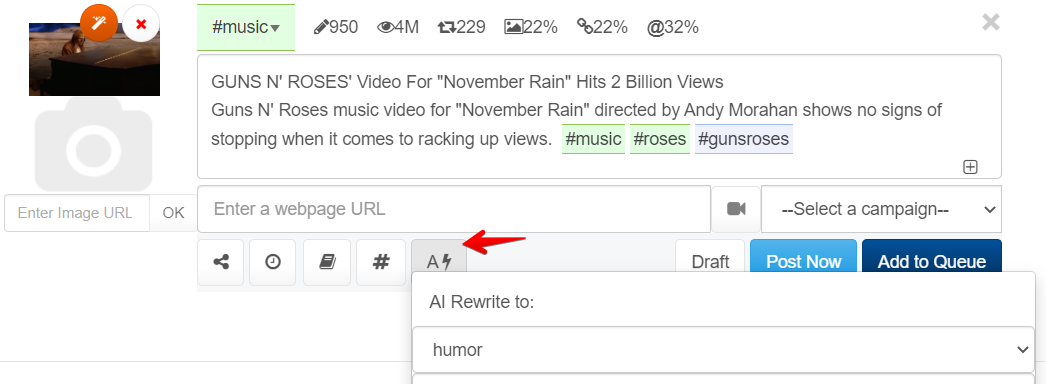
Effective social media management with AI involves not only creating and scheduling posts but also continuously analyzing their performance to refine strategies. Understanding how AI-generated content resonates with audiences enables marketers to optimize engagement and achieve better results over time. Regular assessment and data-driven adjustments form the backbone of a successful social media presence powered by artificial intelligence.
Assessing the effectiveness of AI-generated social media posts requires a systematic approach to collecting and analyzing engagement metrics. By monitoring key indicators such as likes, shares, comments, click-through rates, and conversion rates, marketers can determine which content strategies are performing well and identify areas for improvement. Organizing this data efficiently allows for clear insights and informed decision-making that enhances future content creation efforts.
Methods for Collecting and Organizing Engagement Data
Robust data collection is essential to accurately evaluate AI content performance. Platforms like social media analytics tools, third-party reporting software, and native insights features provide comprehensive metrics. These tools automate the collection process, ensuring real-time data is captured consistently. To organize this data effectively, creating centralized dashboards or spreadsheets helps visualize trends and patterns. Regularly updating these records ensures that insights are current and actionable.
Using structured data collection and organization techniques transforms raw engagement numbers into strategic insights, facilitating targeted improvements in AI-driven content strategies.
Iterative Refinement of AI Content Based on Feedback and Analytics
Refining AI content strategies is an ongoing process driven by feedback and analytics. Analyzing which types of posts generate the highest engagement enables marketers to tweak content themes, formats, and posting times. Incorporating audience feedback, such as comments and direct messages, provides qualitative insights that complement quantitative data. Testing different AI algorithms, adjusting tone, and experimenting with new content styles help optimize performance iteratively.
For example, if data shows that video posts created by AI receive significantly higher engagement than static images, marketers can allocate more resources to video content. Additionally, using A/B testing with AI-generated captions or headlines can reveal what resonates best with the target audience, leading to continuous strategic improvements.
Designing a Responsive Data Table for Tracking Post Performance Metrics
A well-designed data table enables systematic tracking and comparison of social media post performance over time. The table should be adaptable to various devices and easy to update, ensuring accessibility for team members across roles. Key performance metrics to include are:
| Post ID | Date Published | Platform | Content Type | Engagements (Likes, Shares, Comments) | Impressions | Clicks | Click-Through Rate (CTR) | Conversion Rate | Notes/Observations |
|---|---|---|---|---|---|---|---|---|---|
| 001 | 2024-04-10 | Video | 1500 | 10,000 | 250 | 2.5% | 1.2% | High engagement; video length optimal | |
| 002 | 2024-04-11 | Image | 800 | 8,500 | 180 | 2.1% | 0.9% | Static image performance slightly below average |
Regularly updating this table allows teams to identify patterns, such as which content themes or formats lead to higher engagement. Using filters and conditional formatting can further highlight top-performing posts or areas needing improvement, ensuring the AI content strategy remains responsive and data-driven.
Closing Notes
Mastering how to create social media posts with AI empowers you to produce high-quality content efficiently while maintaining audience engagement. By integrating AI tools into your workflow, you can stay ahead in the dynamic social media landscape and refine your strategies through data-driven insights, ensuring sustained success.